Why do claims remain to be rejected even when the CPT and ICD codes are precise? Payment delays or claim denials are often caused by outdated or incorrect taxonomy codes. Research from 2026 indicates that between 26% and 49% of Medicare claims have errors, and even minor discrepancies in data, like taxonomy, can result in denials. Patient’s verification of provider information is directly impacted by the fact that many billing teams prefer procedure and diagnosis codes over taxonomy compliance.
Medical billing errors remain a major issue across healthcare systems. Reports indicate that up to 80% of medical bills contain at least one error, and a significant portion of denials are linked to technical issues such as incorrect provider data. Even taxonomy-related errors contribute to avoidable rework, increasing administrative burden and delaying reimbursement.
Updating taxonomy codes in NPPES is required when provider details change, but the process is often handled incorrectly or delayed. When done right, it supports clean claims and faster payments. When done wrong, it leads to payer mismatches, repeated denials, and compliance risks. This guide explains how to change/update the taxonomy code for NPI with clear steps, billing impact, and error prevention strategies.
What is a Taxonomy Code in NPI, and why does it matter
This section explains what a taxonomy code represents inside an NPI record and why it is required for provider identification. It also connects taxonomy accuracy with claim acceptance, payer validation, and billing consistency in real healthcare workflows.
Understanding taxonomy codes is essential for medical billing teams, credentialing staff, and healthcare providers. Incorrect or outdated entries often lead to claim rejections even when CPT and ICD coding are correct.
Definition of Taxonomy Code in NPPES
A taxonomy code is a standardized code that defines a healthcare provider’s specialty or classification. It is stored in the NPPES database along with the National Provider Identifier (NPI).
Key points:
- Each provider must select at least one taxonomy code in their NPI record
- Providers may have multiple taxonomy codes if they practice in more than one specialty
- One taxonomy must be marked as the primary taxonomy
- The code must match the provider’s actual licensed role and credentialed specialty
How Taxonomy Codes Impact Claims and Reimbursement
Taxonomy codes directly affect how payers identify and process claims. They are used to confirm whether a provider is eligible to bill for a specific service under a given specialty.
Key impacts include:
1. Claim acceptance or denial
- A mismatch between the taxonomy and the service billed can trigger automatic rejection.
2. Provider credentialing validation
- Insurance payers verify taxonomy during enrollment and revalidation cycles.
3. Reimbursement accuracy
- Incorrect taxonomy may route claims under the wrong specialty category, affecting payment levels.
4. System alignment across platforms
- NPPES, PECOS, and payer systems must reflect the same taxonomy data.
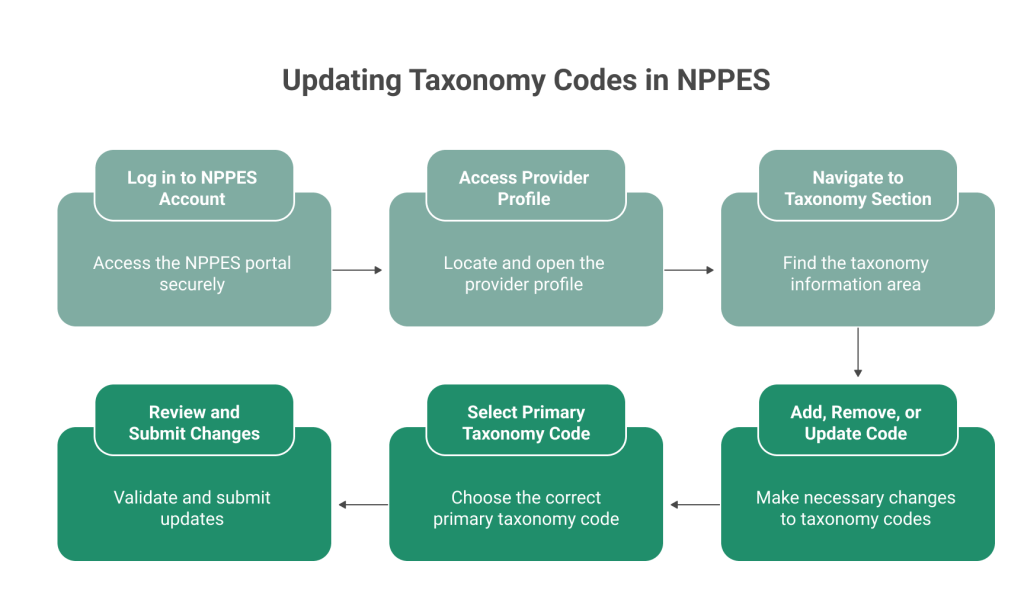
How to Change/Update Taxonomy Code for NPI
This section explains the exact process used to update taxonomy codes in the NPPES system. It focuses on practical steps used by billing teams, credentialing staff, and healthcare providers to keep NPI data accurate and aligned with payer requirements.
In 2026, many claim rejections are still linked to mismatched provider taxonomy data. A correct update in NPPES helps reduce denial risk and keeps provider records consistent across payer systems.
Step 1: Log in to the NPPES Account
Start by accessing the official NPPES portal using your credentials. Use the correct login linked to the NPI you need to update.
Key actions:
1. Enter username and password securely
2. Select “Sign In” on the NPPES portal
3. Verify access to the individual or organization’s NPI
Step 2: Access Provider Profile
After login, locate the provider profile linked to the NPI number.
Steps:
1. Select the correct NPI from your dashboard
2. Open the “Manage Provider Information” section
3. Click the edit (pencil) option
Step 3: Navigate to the Taxonomy Section
Inside the provider profile, move to the taxonomy section where specialty codes are listed.
Actions:
1. Scroll to the taxonomy information area
2. Review current taxonomy codes
3. Identify primary and secondary entries
Step 4: Add, Remove, or Update Taxonomy Code
Make required updates based on current provider role or credential changes.
Actions:
1. Add a new taxonomy code if the specialty has changed
2. Remove outdated or incorrect codes
3. Update classification if the role has been modified
Step 5: Select Primary Taxonomy Code
Choose the correct primary taxonomy code carefully. This code drives how payers classify the provider.
Key points:
1. One taxonomy must be marked as primary
2. Primary code should reflect the main billed specialty
3. Incorrect selection may affect claim processing
Step 6: Review and Submit Changes
The final step is to validate and submit updates.
Steps:
1. Review all updated taxonomy entries
2. Run system error check
3. Submit changes in NPPES
4. Save confirmation or tracking number
When You Need to Update Taxonomy Code in NPPES
In this section, we will discuss the situations where updating a taxonomy code in NPPES becomes necessary. It helps billing teams, credentialing staff, and healthcare providers identify when changes are required to avoid claim issues and enrollment mismatches.
Change in Specialty or Services
A taxonomy update is required when a provider changes specialty or adds new services. This ensures the NPI record reflects current clinical practice. Billing accuracy depends on correct provider classification.
Common cases include moving from general practice to a specialty, adding services under a new certification, or changes after licensing updates. Each change must be reflected in NPPES to avoid data mismatch.
If the taxonomy is not updated, claims may be processed under the wrong classification. This can lead to rejections or delayed payments. Payers rely on taxonomy to validate service eligibility.
Credentialing or Enrollment Updates
Taxonomy updates are often needed during payer enrollment or credentialing changes. These updates ensure consistency between NPPES and payer systems. Mismatched data can interrupt claim processing.
Situations include joining a new insurance network, changing group affiliation, or updating practice locations. Each requires alignment between enrollment records and NPI data.
If taxonomy is not updated in NPPES, payer systems may reject claims due to provider mismatch. This leads to rework and payment delays. Accurate updates support smooth claim validation.
Compliance Requirements
Taxonomy updates are required to maintain accurate provider records. NPPES must reflect current information to meet compliance standards. Outdated data can create reporting issues.
Providers are expected to update records within the required timelines after any change. This includes specialty, services, or credentialing updates. Delays can trigger system flags.
In 2026, compliance checks are stricter across Medicare, Medicaid, and commercial payers. Even small inconsistencies can lead to claim reprocessing or manual review. Accurate taxonomy data reduces these risks.
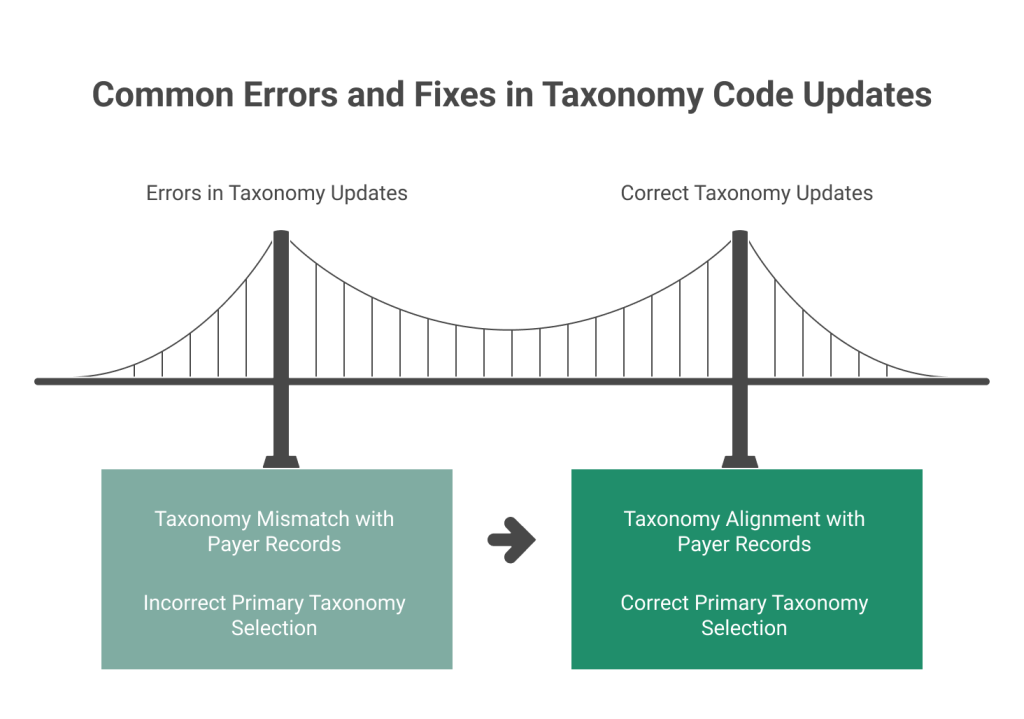
Common Errors When Updating Taxonomy Code (And Fixes)
In 2026, payer systems continue to validate taxonomy data against enrollment and claim records in real time. Small inconsistencies can block claims before adjudication. Understanding these errors helps billing teams reduce avoidable denials.
This section highlights frequent mistakes made during taxonomy code updates in NPPES. These errors often lead to claim rejections, credentialing delays, and payer mismatches even when other billing data is correct.
Taxonomy Mismatch with Payer Records
A common issue occurs when the NPPES taxonomy does not match payer enrollment files.
Key points:
1. NPPES shows updated taxonomy, but the payer system still has old data
2. Claims get rejected due to a provider classification mismatch
3. Clearinghouses flag inconsistencies during claim scrubbing
Fix:
1. Ensure NPPES, PECOS, and payer records are updated together
2. Confirm taxonomy alignment after any provider change
3. Revalidate enrollment with major payers if discrepancies appear
Incorrect Primary Taxonomy Selection
Selecting the wrong primary taxonomy is another frequent error.
Key points:
1. Only one taxonomy can be set as primary
2. Primary code determines billing specialty recognition
3. Incorrect selection affects claim routing and approval
Fix:
1. Choose the primary taxonomy based on the main billed specialty
2. Review billing patterns before final selection
3. Align primary taxonomy with payer enrollment classification
Conclusion
Accurate taxonomy data is essential for clean claims, correct provider identification, and consistent payer validation. Even small mismatches between NPPES, PECOS, and payer systems can lead to denials and payment delays. Regular updates and correct primary taxonomy selection reduce these risks.
Billing teams and providers must review taxonomy codes after any change in specialty, services, or enrollment status. Timely updates and system alignment support faster reimbursement and fewer claim errors. Consistent monitoring helps maintain compliance and billing accuracy.
FAQs
How long does it take to update a taxonomy code in NPPES?
Updates in NPPES are usually processed within a few hours after submission. However, it may take several days for changes to reflect across payer systems, clearinghouses, and EHR platforms.
Can I have more than one taxonomy code on my NPI?
Yes, providers can have multiple taxonomy codes if they practice in more than one specialty. One code must be selected as the primary taxonomy, which is used for billing and payer identification.
What happens if my taxonomy code does not match payer records?
A mismatch between NPPES and payer records can lead to claim rejections or delays. Payers validate taxonomy during claim processing, so alignment across all systems is required.
Do I need to update taxonomy codes after credentialing changes?
Yes, any change in specialty, services, or payer enrollment requires an update in NPPES. Keeping taxonomy data current ensures accurate provider classification and reduces denial risk.
Why are claims denied even after updating the taxonomy code?
Claims may still be denied if updates are not reflected in PECOS, payer systems, or clearinghouses. Delays in data synchronization or incorrect primary taxonomy selection can also cause issues.