
If an insurance company can’t access your CAQH profile, it can delay provider credentialing, slow payer enrollment, and postpone reimbursements. In most cases, the issue is caused by one of a few common problems, such as missing payer authorization, an expired CAQH re-attestation, incomplete profile information, or incorrect provider details.
The good news is that these issues are usually easy to identify and resolve once you know what to look for.
Insurance companies rely on accurate and up-to-date CAQH information to verify provider credentials during the enrollment process. Even a minor oversight—like an expired malpractice insurance document or an incorrect National Provider Identifier (NPI)—can prevent a payer from accessing your profile when they need it.
In this guide, we’ll explain how insurance companies access your CAQH profile, explore the most common reasons they may not be able to view it, and provide practical solutions to help you avoid unnecessary credentialing delays.
How Insurance Companies Access Your CAQH Profile
Before troubleshooting the problem, it’s important to understand how insurance companies use your CAQH profile.
The Council for Affordable Quality Healthcare (CAQH) maintains a centralized provider database where healthcare professionals store their credentialing information. Instead of submitting the same documents to every insurance company individually, providers can maintain a single profile containing information such as:
- Personal and professional details
- Medical licenses
- DEA registration
- Board certifications
- Employment history
- Practice locations
- Professional liability insurance
- Hospital affiliations
Participating insurance companies access this information during provider credentialing, payer enrollment, and recredentialing to verify that providers meet their participation requirements.
However, simply creating a CAQH profile doesn’t automatically make it visible to every insurance company.
Providers must keep their profile complete, re-attest every 120 days, and authorize participating organizations to access their information. If any of these steps are missed, insurers may be unable to retrieve the information they need to process your credentialing application.
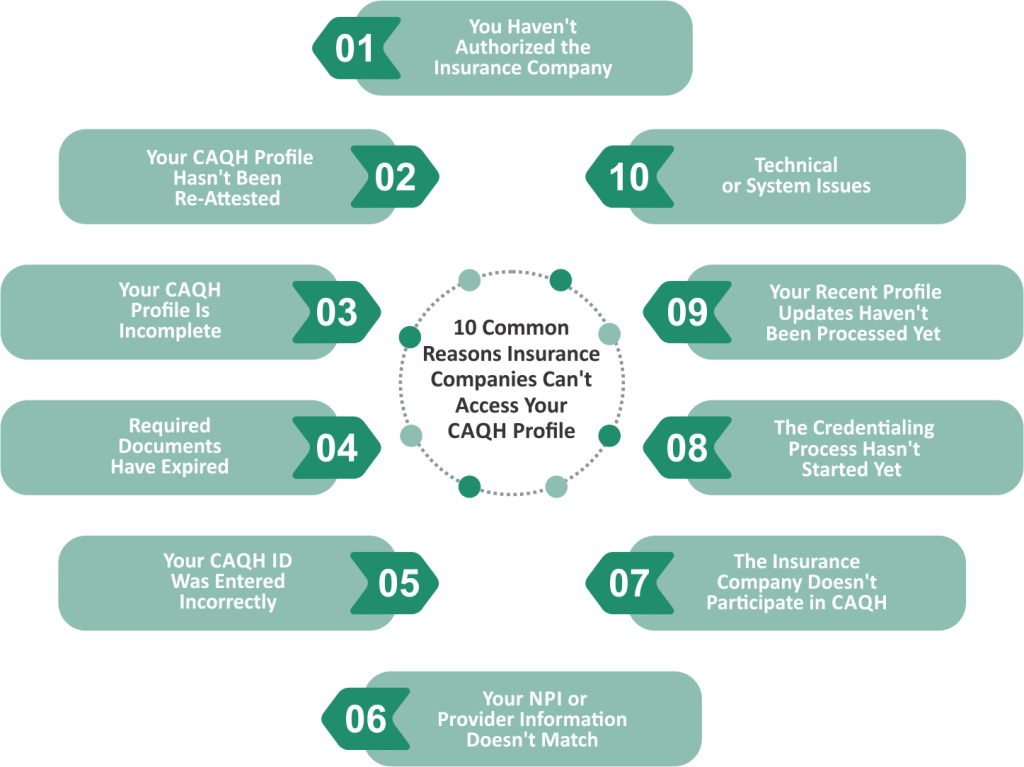
10 Common Reasons Insurance Companies Can’t Access Your CAQH Profile
Although every credentialing situation is unique, most access issues fall into a handful of common categories. Identifying the root cause early can help prevent unnecessary delays in provider enrollment and reimbursement.
1. You Haven’t Authorized the Insurance Company
One of the most common reasons an insurance company can’t access your CAQH profile is that you haven’t granted permission.
CAQH gives providers control over which participating organizations can view their information. If the payer hasn’t been authorized, they won’t be able to retrieve your profile—even if every section is complete.
How to Fix It
- Log in to your CAQH account.
- Navigate to the Authorization section.
- Confirm that the insurance company has permission to access your profile.
- Save any changes and verify that your authorization is active.
If you’re unsure whether a payer participates in CAQH, contact their credentialing department before submitting your application.
2. Your CAQH Profile Hasn’t Been Re-Attested
CAQH requires providers to re-attest their profile every 120 days, even if no information has changed.
Re-attestation confirms that your credentials remain accurate and allows participating organizations to rely on your information during credentialing.
When providers miss this deadline, their profile may no longer be considered current, which can delay credentialing reviews or payer enrollment.
How to Fix It
- Log in to your CAQH account.
- Review all sections for accuracy.
- Update any outdated information.
- Complete your electronic re-attestation.
- Save your confirmation for future reference.
Setting calendar reminders before each 120-day deadline can help prevent missed attestations.
3. Your CAQH Profile Is Incomplete
Even if you’ve created a CAQH account, missing information can prevent insurers from completing their credentialing review.
Common examples include:
- Incomplete employment history
- Missing education details
- Unanswered disclosure questions
- Incomplete practice information
- Missing hospital affiliations
Insurance companies often require a fully completed profile before moving forward with credentialing.
How to Fix It
Review each section of your CAQH profile carefully and complete any fields marked as incomplete.
Many providers assume optional fields aren’t important, but certain payers may require additional information depending on their credentialing policies.
4. Required Documents Have Expired
Credentialing relies on current documentation.
If your profile contains expired credentials, insurance companies may pause their review until updated documents are available.
Documents that commonly expire include:
- State medical licenses
- DEA registration
- Professional liability insurance
- Board certifications
- Controlled substance registrations
Even if the rest of your profile is accurate, expired documents can interrupt the credentialing process.
How to Fix It
Before each CAQH re-attestation, verify that all uploaded documents remain valid.
Whenever you renew a license or insurance policy, upload the updated document as soon as possible instead of waiting until your next review cycle.
Keeping your documentation current helps reduce unnecessary follow-up requests from insurance payers.
5. Your CAQH ID Was Entered Incorrectly
Sometimes the issue isn’t with your CAQH profile at all.
Insurance companies search for providers using information supplied during the credentialing process. If your CAQH ID was entered incorrectly on an enrollment application, the payer may be unable to locate your profile.
Simple typing errors, missing digits, or submitting an outdated provider identifier can all create access problems.
How to Fix It
Verify that the CAQH ID submitted to the insurance company exactly matches the number displayed in your CAQH account.
If you’ve already submitted your application, contact the payer’s credentialing department and ask them to confirm the identifier they have on file.
Correcting a simple data entry error can often resolve the issue quickly without restarting the credentialing process.
6. Your NPI or Provider Information Doesn’t Match
Insurance companies compare your CAQH profile with the information you submitted on your credentialing application. If there are discrepancies, they may be unable to verify your identity or access the correct profile.
Common mismatches include:
- Incorrect National Provider Identifier (NPI)
- Different legal or professional names
- Outdated practice addresses
- Inconsistent Tax Identification Numbers (TINs)
- Different email addresses or phone numbers
Even small inconsistencies can trigger additional verification requests and delay credentialing.
How to Fix It
Review your CAQH profile alongside your credentialing application and ensure all provider information matches exactly. Whenever your professional information changes, update it across all platforms—not just CAQH.
7. The Insurance Company Doesn’t Participate in CAQH
While CAQH is widely used, not every insurance company accesses provider information through the CAQH Provider Data Portal.
Some regional payers, employer-sponsored health plans, or specialty networks may require providers to complete separate credentialing applications, even if a CAQH profile exists.
How to Fix It
Before assuming there’s an issue with your CAQH account, confirm that the insurance company participates in CAQH. If they don’t, ask whether additional enrollment forms or documentation are required.
8. The Credentialing Process Hasn’t Started Yet
Creating a CAQH profile doesn’t automatically notify insurance companies that you’re ready for credentialing.
In many cases, the payer must first receive your provider enrollment application before accessing your CAQH profile.
If your application hasn’t been submitted—or is still waiting to be reviewed—the insurance company may not have attempted to access your profile yet.
How to Fix It
Contact the payer’s credentialing department to confirm:
- Your application has been received.
- Credentialing has been initiated.
- Your CAQH ID is attached to your application.
Sometimes the issue is simply timing rather than a problem with your profile.
9. Your Recent Profile Updates Haven’t Been Processed Yet
If you’ve recently updated your CAQH profile, those changes may not be visible immediately.
Insurance companies often retrieve provider data according to their own internal workflows, meaning there can be a short delay before updated information is reflected in their systems.
How to Fix It
If you’ve recently:
- Completed your re-attestation
- Uploaded new documents
- Updated practice information
- Authorized a new payer
allow a reasonable amount of processing time before following up. If the delay continues, contact the payer to verify whether they have retrieved the latest version of your profile.
10. Technical or System Issues
Although less common, technical issues can occasionally prevent insurance companies from accessing a CAQH profile.
Examples include:
- Temporary CAQH system maintenance
- Browser or login issues
- Internal payer system outages
- Data synchronization delays
- Integration problems between credentialing systems
These issues are usually temporary but can still delay credentialing if they aren’t identified quickly.
How to Fix It
If you’ve confirmed your profile is complete, authorized, and current, reach out to the payer’s credentialing team to determine whether a technical issue is preventing access. If necessary, contact CAQH Support for additional assistance.
How to Give an Insurance Company Access to Your CAQH Profile
If the problem is related to authorization, granting access only takes a few minutes.
- Log in to your CAQH Provider Data Portal account.
- Review your provider profile and ensure all information is current.
- Navigate to the Authorization section.
- Grant access to the participating insurance company or confirm your existing authorization is active.
- Save your changes and notify the payer if additional action is required.
Completing these steps promptly can help avoid unnecessary credentialing delays.
When Should You Contact CAQH vs. the Insurance Company?
Knowing who to contact can save valuable time.
| Situation | Best Contact |
| Login or account access issues | CAQH Support |
| Problems granting payer authorization | CAQH Support |
| Incorrect CAQH ID submitted | Insurance Company |
| Credentialing application status | Insurance Company |
| Payer still can’t access an active profile | Contact the insurance company first, then CAQH if needed |
How Dr Credentialing Can Help
Managing CAQH profiles, provider enrollment, and insurance credentialing requires ongoing attention to detail. Missing a deadline or overlooking a small update can delay approvals and slow reimbursements.
At Dr Credentialing, we help healthcare providers streamline the credentialing process by assisting with:
- CAQH profile setup and maintenance
- Re-attestation tracking
- Provider enrollment
- Insurance credentialing
- Document management
- Ongoing credentialing support
Our team works proactively to identify potential issues before they affect your ability to join payer networks or receive timely reimbursements.
Conclusion
If an insurance company can’t access your CAQH profile, the problem is often related to authorization settings, expired re-attestation, incomplete information, or data inconsistencies. By regularly reviewing your profile, keeping documents current, and confirming payer access, you can minimize credentialing delays and maintain smoother provider enrollment.
If you’re looking for expert support, Dr Credentialing can help manage your CAQH profile, streamline insurance credentialing, and keep your practice on track so you can focus on delivering quality patient care.
Frequently Asked Questions
Why can’t an insurance company see my CAQH profile?
The most common reasons include missing payer authorization, an incomplete profile, expired re-attestation, incorrect provider information, or delays in the credentialing process.
How do I authorize an insurance company in CAQH?
Log in to your CAQH account, navigate to the Authorization section, select the participating payer, and save your changes.
Does every insurance company use CAQH?
No. While many commercial insurance companies use CAQH, some organizations require providers to complete separate credentialing or enrollment applications.
How long does it take for an insurance company to access my CAQH profile?
It varies by payer. Some organizations can access your profile shortly after authorization, while others may retrieve provider information according to their internal credentialing schedule.
Can a credentialing company manage my CAQH profile?
Yes. Many providers work with credentialing specialists who assist with profile maintenance, document updates, re-attestation, and payer enrollment while ensuring the provider retains appropriate account control.