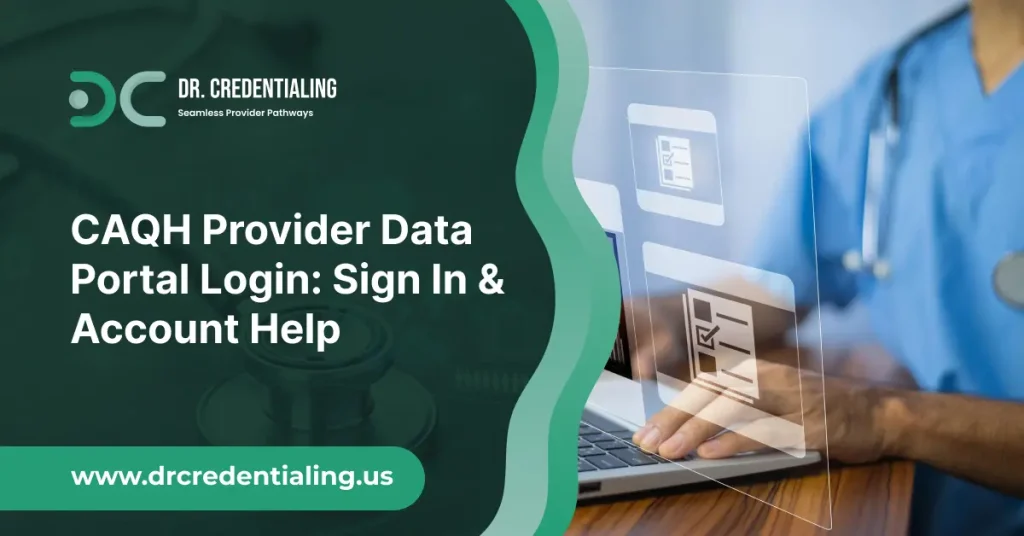
Managing provider credentials can be overwhelming, especially when multiple insurance companies require the same information in different formats. The CAQH Provider Data Portal simplifies this process by giving healthcare professionals a centralized platform to securely store, update, and share their professional information with participating health plans and organizations.
Whether you’re logging in for the first time, completing your provider profile, updating your credentials, or trying to recover a locked account, understanding how the portal works can save you valuable time and help prevent unnecessary credentialing delays.
In this article, you’ll learn everything you need to know about the CAQH Provider Data Portal login process, from creating an account and signing in to troubleshooting common login issues, completing your provider profile, uploading required documents, and maintaining your account through regular reattestation.
What Is the CAQH Provider Data Portal?
The CAQH Provider Data Portal is a secure online platform that allows healthcare providers to store, manage, and share their professional and practice information with participating health plans, hospitals, and other healthcare organizations.
Instead of completing separate credentialing applications for multiple organizations, providers can maintain a single profile that authorized organizations can access during the credentialing and enrollment process.
The portal is designed to simplify provider data management by keeping essential information, such as licenses, education, certifications, work history, malpractice insurance, and practice details, in one centralized location.
Once your profile is complete and attested, participating organizations can review the information they need without requiring duplicate paperwork.
The platform is commonly used by:
- Physicians
- Nurse Practitioners (NPs)
- Physician Assistants (PAs)
- Dentists
- Behavioral health professionals
- Physical, occupational, and speech therapists
- Group practices and healthcare organizations
By maintaining an accurate and up-to-date profile, providers can reduce administrative work, improve data accuracy, and help speed up credentialing with participating organizations.
How to Log In to the CAQH Provider Data Portal?
Logging into the CAQH Provider Data Portal is a straightforward process, provided you have an active account and your login credentials available.
Follow these steps to access your account:
- Visit the official CAQH Provider Data Portal login page.
- Enter your registered username.
- Type your password carefully, ensuring Caps Lock is turned off.
- Complete any multi-factor authentication (MFA) verification if prompted.
- Click the Sign In button to access your provider dashboard.
After logging in successfully, you’ll be able to:
- Review and update your provider profile.
- Upload or replace required documents.
- Complete or renew your attestation.
- Authorize participating organizations to access your information.
- Monitor credentialing-related tasks and notifications.
For security reasons, always sign out after using the portal, especially if you’re accessing it from a shared or public computer.
How to Create a New CAQH Provider Account?
If you don’t already have an account, you’ll need to register before accessing the Provider Data Portal. The registration process is typically initiated after a participating health plan, hospital, or healthcare organization requests your credentialing information.
Before creating your account, gather the following information:
- National Provider Identifier (NPI)
- Professional license information
- Active email address
- Basic practice details
- Personal identification information
The registration process generally involves these steps:
- Visit the CAQH registration page.
- Verify your identity using the requested provider information.
- Create a unique username and strong password.
- Verify your email address.
- Set up security questions or multi-factor authentication.
- Sign in and begin completing your provider profile.
After registration, take time to review every section of your profile before submitting it for attestation. Providing complete and accurate information from the beginning can help prevent delays during credentialing.
What You’ll Need Before Logging In
Having the right information ready before signing in makes it much easier to complete or update your provider profile in one session. Missing documents or incomplete details can slow down the credentialing process and require additional follow-up later.
Here’s a checklist of the information commonly requested:
- CAQH Provider ID (if already assigned)
- National Provider Identifier (NPI)
- State medical or professional licenses
- DEA registration (if applicable)
- Board certification details
- Education and training history
- Employment history
- Practice locations
- Hospital affiliations
- Professional liability (malpractice) insurance information
- Professional references
- Government-issued identification (if requested)
- Digital copies of supporting documents in accepted file formats
Keeping digital copies of these documents in a dedicated folder can make future profile updates and reattestation much faster.
How to Complete Your CAQH Provider Profile
Completing your provider profile accurately is one of the most important steps in the credentialing process. Insurance companies and participating organizations rely on this information to verify your qualifications, so every section should be reviewed carefully before submitting your attestation.
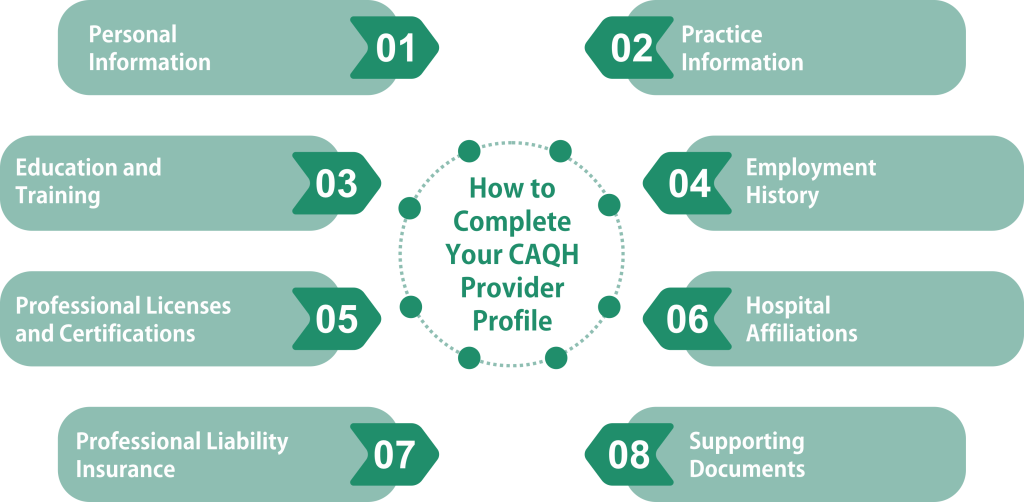
Most provider profiles include the following sections:
Personal Information: Enter your legal name, contact information, date of birth, and other identifying details exactly as they appear on your professional records.
Practice Information: Add your primary and additional practice locations, office contact details, specialties, and accepted patient information where applicable.
Education and Training: List your medical school, residency, fellowship, internships, and any additional professional training you’ve completed.
Employment History: Provide a complete employment timeline with no unexplained gaps whenever possible. Include current and previous practice affiliations.
Professional Licenses and Certifications: Add all active state licenses, board certifications, DEA registration (if applicable), and any other professional credentials. Make sure expiration dates are accurate.
Hospital Affiliations: Include current admitting privileges, staff appointments, or hospital affiliations that apply to your practice.
Professional Liability Insurance: Enter your malpractice insurance details, including the carrier, policy number, coverage dates, and limits. Upload supporting documentation if required.
Supporting Documents: Upload clear, legible copies of licenses, certifications, insurance documents, and any additional paperwork requested by participating organizations.
Review and Attest: Before submitting, carefully review every section for accuracy. Once everything is complete, submit your attestation to confirm that the information provided is current and truthful. Keeping your profile updated whenever your credentials or practice information changes can help prevent credentialing delays and reduce requests for additional documentation later.
How to Upload Documents to the CAQH Provider Data Portal
Supporting documents are an essential part of your CAQH profile. Participating health plans and healthcare organizations use these files to verify your credentials, so uploading clear and current documents can help prevent delays during the credentialing process.
To upload documents:
- Sign in to your CAQH Provider Data Portal account.
- Navigate to the Documents or Supporting Documents section.
- Select the appropriate document category.
- Click Upload and choose the file from your device.
- Confirm that the document has uploaded successfully.
- Save your changes before leaving the page.
Common Documents You May Need to Upload
Depending on your profession and credentialing requirements, you may be asked to provide:
- State professional licenses
- DEA registration certificate (if applicable)
- Board certification documents
- Professional liability (malpractice) insurance certificate
- Curriculum vitae (CV) or résumé
- Government-issued identification
- Hospital privilege documentation
- Additional certifications or training records
Tips for Successful Uploads
To avoid upload issues, follow these best practices:
- Use clear, high-quality scans.
- Ensure documents are current and not expired.
- Upload files in supported formats, such as PDF or JPEG (if accepted).
- Keep file names descriptive for easier identification.
- Verify that every uploaded document appears correctly after submission.
Regularly reviewing your uploaded documents and replacing expired files helps keep your profile accurate and ready for credentialing requests.
How to Find Your CAQH Provider ID
Your CAQH Provider ID is a unique identification number associated with your account. Participating organizations often request this number when initiating credentialing or provider enrollment, making it important to know where to locate it.
You can typically find your Provider ID by:
- Checking your CAQH welcome or registration email.
- Logging into your account and viewing your profile or dashboard.
- Reviewing account settings or profile details within the portal.
- Contacting CAQH support if you’re unable to locate it.
If you’re creating a new account, your Provider ID may not be available until your registration has been completed and processed.
It’s a good idea to keep your Provider ID in a secure location so you can quickly provide it whenever a health plan or credentialing organization requests it.
Forgot Your Username or Password?
Forgotten login credentials are one of the most common reasons providers are unable to access their accounts. Fortunately, the recovery process is designed to help you regain access securely.
Resetting Your Password
If you’ve forgotten your password:
- Open the CAQH login page.
- Select the Forgot Password option.
- Enter your registered username or email address.
- Complete any required identity verification.
- Follow the instructions sent to your registered email to create a new password.
When creating a new password, choose a strong combination of uppercase and lowercase letters, numbers, and special characters to improve account security.
Recovering Your Username
If you don’t remember your username, select the Forgot Username option on the login page. After verifying your identity, your username will typically be sent to your registered email address.
If You No Longer Have Access to Your Registered Email
If your email address has changed or you cannot access the inbox associated with your account, you may need to verify your identity through additional security steps or contact CAQH support for assistance.
Account Lockouts
For security purposes, entering incorrect login credentials multiple times may temporarily lock your account. If this happens:
- Wait for the lockout period to expire if instructed.
- Reset your password if necessary.
- Contact customer support if you remain unable to access your account.
Keeping your contact information up to date can make future account recovery much quicker.
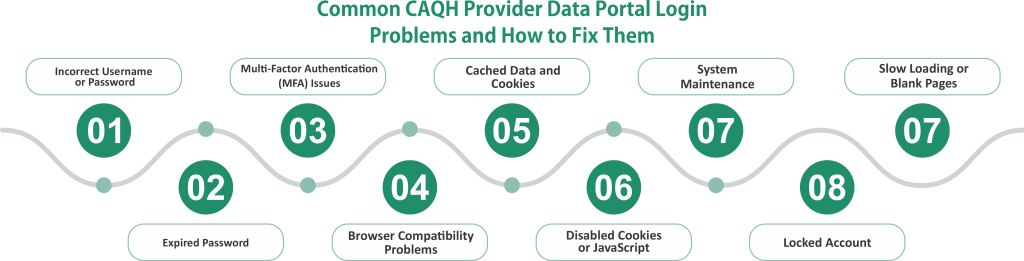
Common CAQH Provider Data Portal Login Problems and How to Fix Them
Although the login process is usually straightforward, providers occasionally encounter technical or account-related issues. Understanding the most common problems can help you regain access quickly.
Incorrect Username or Password:
Double-check your login credentials before trying again. Pay attention to capitalization, spacing, and any autofill information saved by your browser.
Expired Password:
Some accounts require periodic password updates. If your password has expired, use the password recovery option to create a new one.
Multi-Factor Authentication (MFA) Issues:
If you don’t receive your verification code:
- Confirm that your registered phone number or email address is correct.
- Check your spam or junk folder.
- Wait a few minutes before requesting another code.
- Ensure your mobile device has network connectivity.
Browser Compatibility Problems:
Older browsers or unsupported versions may prevent the portal from functioning correctly. Updating your browser or trying another supported browser often resolves login issues.
Cached Data and Cookies:
Corrupted browser cache or cookies can interfere with authentication. Clearing your browser’s cache and cookies before signing in again often fixes persistent login loops.
Disabled Cookies or JavaScript:
The portal relies on browser settings to function properly. Make sure cookies and JavaScript are enabled before attempting to log in.
System Maintenance:
Occasionally, the portal may be temporarily unavailable due to scheduled maintenance or system updates. If you’ve confirmed your credentials are correct, waiting a short time before trying again may resolve the issue.
Locked Account:
Too many unsuccessful login attempts can trigger a temporary security lock. Resetting your password or contacting support may be necessary if access isn’t automatically restored.
Slow Loading or Blank Pages:
A slow internet connection, browser extensions, or temporary server issues can sometimes prevent pages from loading correctly. Refreshing the page, disabling problematic extensions, or switching networks may help.
If you’ve tried these troubleshooting steps and still can’t access your account, contacting CAQH customer support is the best way to resolve account-specific issues.
How to Complete Your CAQH Reattestation
Completing your CAQH profile isn’t a one-time task. To keep your information available to participating organizations, you’ll need to periodically reattest that the information in your profile remains accurate.
Reattestation is an important part of maintaining an active provider profile because it confirms that your credentials, licenses, practice information, and supporting documents are still current.
To complete your reattestation:
- Log in to your CAQH Provider Data Portal account.
- Review every section of your provider profile.
- Update any information that has changed since your last attestation.
- Replace expired licenses, insurance certificates, or other supporting documents.
- Carefully review your information for accuracy.
- Submit your new attestation through the portal.
Even if nothing has changed, you should still complete the reattestation process when prompted. Missing a required reattestation can delay credentialing, provider enrollment, or participation with health plans that rely on your CAQH profile.
Setting calendar reminders to review your account regularly is one of the easiest ways to ensure your information stays current throughout the year.
Why Insurance Companies Require the CAQH Provider Data Portal
Insurance companies credential thousands of healthcare providers every year. Collecting the same professional information from each provider individually would be time-consuming and inefficient. The CAQH Provider Data Portal streamlines this process by providing a centralized database where providers can maintain a single, standardized profile.
When you authorize a participating organization to access your information, it can review your credentials without repeatedly requesting the same documents. This reduces administrative work for both providers and payers while helping maintain consistent and accurate records.
Some of the primary reasons insurers use the CAQH Provider Data Portal include:
- Verifying provider qualifications and licenses.
- Supporting credentialing and recredentialing.
- Confirming malpractice insurance coverage.
- Reviewing education, training, and work history.
- Reducing duplicate paperwork.
- Maintaining accurate provider directories.
- Speeding up provider enrollment.
Because many health plans rely on CAQH data during credentialing, keeping your profile complete and current can help minimize unnecessary delays.
Best Practices for Maintaining Your CAQH Profile
Keeping your profile updated is just as important as completing it the first time. An outdated profile can lead to credentialing delays, requests for additional documentation, or interruptions in provider enrollment.
Here are several best practices to help maintain an accurate CAQH profile:
- Review your profile regularly, even when you haven’t received a reattestation reminder.
- Update your contact information whenever your email address or phone number changes.
- Renew professional licenses before they expire.
- Replace expired malpractice insurance certificates promptly.
- Keep your employment and practice information current.
- Add new board certifications or professional credentials as you earn them.
- Update hospital affiliations whenever they change.
- Review uploaded documents to ensure they remain valid and legible.
- Complete reattestation on time whenever prompted.
Making small updates throughout the year is much easier than trying to update your entire profile at once.
Security Tips for Protecting Your CAQH Account
Your CAQH account contains sensitive personal and professional information, making account security an important responsibility.
To help protect your account:
- Create a strong, unique password that isn’t used for other accounts.
- Enable multi-factor authentication if it’s available.
- Never share your username or password with others.
- Avoid logging in over unsecured public Wi-Fi whenever possible.
- Always log out after using the portal, especially on shared computers.
- Keep your recovery email address and phone number up to date.
- Monitor your account periodically for unexpected changes.
- Update your password immediately if you suspect unauthorized access.
Practicing good cybersecurity habits helps reduce the risk of unauthorized access and protects your professional information.
Benefits of Using the CAQH Provider Data Portal
The CAQH Provider Data Portal offers significant advantages for healthcare providers by reducing repetitive administrative work and making provider information easier to manage.
Some of its key benefits include:
- Centralized provider information: Maintain one profile instead of completing multiple applications.
- Reduced paperwork: Eliminate repetitive data entry for participating organizations.
- Faster credentialing: Accurate and complete information can help streamline the review process.
- Simplified document management: Store important credentials and supporting documents in one place.
- Improved data accuracy: Update your information once rather than notifying multiple organizations individually.
- Greater efficiency: Save time when applying to additional health plans or healthcare organizations.
- Enhanced compliance: Regular updates and reattestation help keep your professional information current.
By maintaining a complete and accurate profile, providers can spend less time on administrative tasks and more time focusing on patient care.
Common Mistakes Providers Should Avoid
Even experienced healthcare providers can make mistakes that slow down credentialing or create unnecessary follow-up requests. Being aware of these common issues can help you maintain an accurate and complete profile.
Some of the most frequent mistakes include:
- Leaving required profile sections incomplete.
- Uploading expired licenses or insurance documents.
- Forgetting to complete scheduled reattestation.
- Providing outdated practice addresses or contact information.
- Failing to update employment history after changing organizations.
- Entering incorrect NPI or license information.
- Leaving unexplained gaps in employment history.
- Forgetting to authorize participating health plans to access the profile.
- Ignoring system notifications requesting updates.
- Using an inactive or inaccessible email address for account recovery.
Taking a few extra minutes to review your profile before submitting it can prevent many of these issues and reduce delays during the credentialing process.
Final Thoughts
The CAQH Provider Data Portal simplifies one of the most time-consuming aspects of healthcare administration by giving providers a secure place to manage their professional information. From creating an account and completing your profile to uploading documents, recovering login credentials, and submitting timely reattestations, every step contributes to a smoother credentialing experience.
Keeping your profile accurate and up to date not only reduces administrative work but also helps participating health plans and healthcare organizations verify your qualifications more efficiently.
By reviewing your account regularly, replacing expired documents, and responding promptly to reattestation requests, you can minimize credentialing delays and ensure your information is always ready when it’s needed.