

You submitted your Medicare enrollment application, but has the contractor received it? Is it still being reviewed, or is a missing document holding up the process?
Checking your Medicare enrollment status in PECOS can help you identify the next step before an unresolved request creates further delays. You can check through the application-status lookup or by signing in to review your enrollment record.
This guide explains how to find your application status, interpret the information available, follow up with the correct Medicare contractor, and verify the details that matter after approval.
What Is PECOS, and Why Does Your Medicare Enrollment Status Matter?
The Provider Enrollment, Chain, and Ownership System (PECOS) is CMS’s online system for managing Medicare provider and supplier enrollment. Providers can use it to submit enrollment applications, review and update enrollment information, and complete other enrollment-related tasks.
Submitting an application does not itself confirm approval. The application must go through the applicable review process, and the enrollment contractor must issue the relevant determination. Checking the status helps you identify whether further information or follow-up may be needed.
Checking your Medicare provider enrollment status helps you determine whether your application is progressing, whether additional information is needed, and whether you should contact your Medicare Administrative Contractor (MAC).
You can use the official CMS Medicare Provider Enrollment guidance for current instructions and enrollment resources.
How to Check Medicare Enrollment Status in PECOS
CMS provides two main ways to check a submitted PECOS application’s status: logging in to PECOS or using the application-status option without logging in.
Method 1: Check PECOS application status without logging in
This option is useful when you want to look up a submitted application without opening your full PECOS account.
- Open the official PECOS website through CMS’s Medicare provider enrollment resources.
- Find Application Status under Helpful Links.
- Open the status lookup and provide the information requested by the system.
- Review the result and note any available status information.
- If the result is unavailable or does not explain the delay, contact the enrollment contractor.
CMS describes this self-service lookup in its Medicare Provider Enrollment guidance.
Important: The application-status lookup is not a substitute for the full enrollment record or direct communication with the contractor. If the information is unavailable, incomplete, or insufficient to explain a delay, follow up with the appropriate MAC or enrollment contractor.
Method 2: Check your application status after logging in to PECOS
If you have access to the enrollment record, you can review the application from within PECOS.
- Open PECOS and sign in using your authorized account.
- Navigate to View Enrollments.
- Look in the Existing Enrollments section.
- Locate the relevant provider or organization and application.
- Review the current status and any available messages or requests.
- Open the application details if further information is available.
- Record any outstanding action and its deadline.
The exact options visible to you may depend on your role and authorized access. If the application belongs to a group practice, confirm that your account has the necessary access to view that organization’s enrollment information.
What information should you have ready?
Before checking the status or contacting the contractor, gather the information that helps identify the application:
- Provider’s legal name or organization’s legal business name.
- National Provider Identifier (NPI).
- Application type, such as individual, group, or supplier enrollment.
- Submission date and any confirmation or tracking details.
- Medicare Administrative Contractor, if known.
- Any correspondence or reference number associated with the application.
Use accurate information that matches the submitted application. Differences between the legal name, NPI, organization details, or application type can make it harder to locate the correct record.

What Do Medicare Enrollment Application Status Messages Mean?
A status message tells you where the application stands in the process, but it does not always explain why processing is taking longer than expected. Interpret the message alongside any correspondence from the Medicare contractor.
| Status or message | What it generally means | Recommended next step |
| Received | The application has reached the processing system or contractor. | Keep the submission confirmation and check for subsequent updates. |
| In review or processing | The application is being reviewed. | Monitor the status and respond promptly to any request for information. |
| Returned for additional information | The contractor needs clarification, corrections, or supporting documents. | Read the request carefully and submit the required response by the stated deadline. |
| Approved | The application has been approved. | Review the approval notice and confirm the enrollment details and effective date. |
| Rejected | The application was not accepted for processing or was returned under the applicable rejection rules. | Read the rejection notice, correct the identified issue, and determine whether a corrected or new application is needed. |
| Status unclear or unavailable | The lookup does not provide enough information to establish what is pending. | Contact the enrollment contractor and ask for the current status and next required action. |
Status labels and the information displayed may depend on the application and current PECOS interface. Use the status shown in your record and the contractor’s correspondence rather than assuming that a general description identifies the exact state of your application.
How Long Does Medicare Enrollment Take?
Medicare enrollment processing time varies by application type, completeness, contractor review, and any additional requirements. There is no single timeline that should be assumed to apply to every provider or supplier.
Rather than relying on a general estimate, check the application’s current status, review outstanding correspondence, and ask the responsible contractor whether anything is preventing the application from moving forward.
What can delay Medicare provider enrollment status updates?
Common causes of enrollment delays include missing signatures, incomplete supporting documents, inconsistent provider or organization information, outstanding application fees when applicable, additional verification requirements, and unanswered requests from the enrollment contractor.
Review the correspondence associated with your application before assuming the delay is caused by contractor processing time. CMS explains that information requests generally require a response within 30 days, but the deadline stated in the actual request should guide your response.
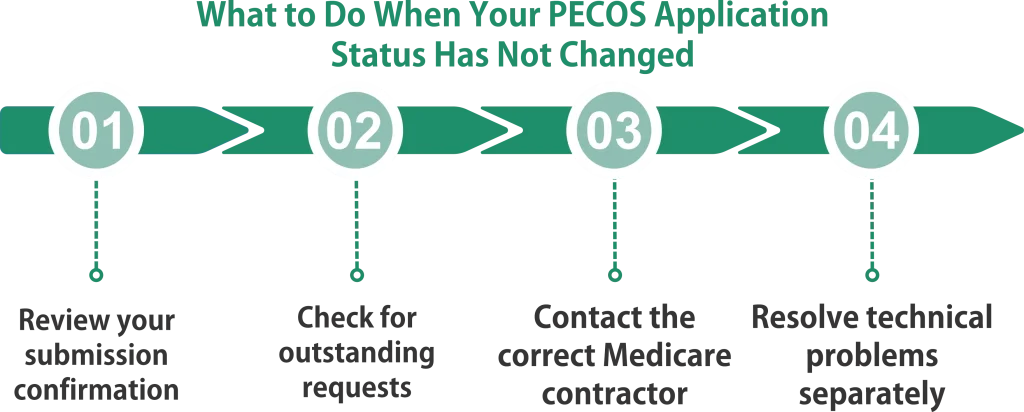
What to Do When Your PECOS Application Status Has Not Changed
An unchanged status does not automatically mean that your application has been rejected or lost. However, it is a reason to check whether the contractor needs anything from you.
1. Review your submission confirmation
Confirm that the application was submitted successfully, not merely saved as a draft. Check for an electronic submission confirmation and retain a copy of the submitted application and supporting documentation.
If you cannot find a confirmation, verify whether the application was actually submitted.
2. Check for outstanding requests
Review PECOS messages, email notifications, and correspondence from the enrollment contractor. Look for requests involving documentation, signatures, enrollment details, or other corrections.
Do not assume that an application is complete simply because the initial submission went through.
3. Contact the correct Medicare contractor
Medicare Administrative Contractors process Medicare fee-for-service enrollment applications for Part A and Part B providers and suppliers. Your MAC is the primary contact for questions about an application under its jurisdiction.
Use the official CMS Medicare Enrollment Assistance and Contacts page to find the appropriate enrollment contractor.
When contacting the contractor, ask specific questions:
- Has the application been received and assigned for processing?
- Is any documentation missing?
- Is a response or correction outstanding?
- Is any additional verification required?
- Is there an estimated next step or a reason the application has not progressed?
Record the date of the contact, the representative’s guidance, and any next steps.
4. Resolve technical problems separately
If you cannot sign in, experience a system error, or cannot access the relevant PECOS screen, the issue may involve account access rather than the enrollment application itself.
For PECOS technical or account-access problems, follow the contact instructions in the CMS Medicare Provider Enrollment guidance. For application-processing questions, contact the enrollment contractor.
How to Check Medicare Provider Enrollment Status for a Group Practice
Group enrollment can involve more than one record. A group organization may have its own enrollment application, while individual clinicians may need separate enrollment records and appropriate reassignment arrangements.
For that reason, checking only the individual provider’s status may not confirm that the group is fully ready to bill, and checking only the organization’s status may not confirm that each clinician’s enrollment is complete.
When reviewing a group practice application, confirm:
- The legal organization name and NPI.
- The status of the group’s enrollment application.
- The status of each individual provider’s enrollment, when applicable.
- Any reassignment or affiliation details that apply.
- The practice locations included in the enrollment.
- Whether any request for additional information remains open.
If a provider is joining an existing practice, coordinate the individual and organizational records so that the relevant enrollment steps are completed correctly.
What Should You Do After Medicare Approves Your Application?
An approved status is an important milestone, but it is worth reviewing the approval notice rather than assuming that every enrollment detail is correct. Check the following:
Provider and organization details: Verify that the legal name, NPI, specialty or taxonomy information, and practice details are accurate.
Practice locations: Confirm that the approved record reflects the relevant location or locations.
Effective date: Review the effective date stated in the official enrollment determination. Do not assume that the submission date and effective date are the same.
Reassignment or group arrangements: Confirm any applicable reassignment information and related enrollment records.
Billing readiness: Coordinate with your billing team to ensure that enrollment information is reflected correctly in its workflow and that other required billing setup steps have been completed.
If you identify an error, contact the enrollment contractor and follow the applicable process to correct it.
How Dr. Credentialing Helps With Medicare Enrollment Status Tracking
Monitoring an application involves more than opening PECOS occasionally. Practices also need to keep documents organized, track outstanding requests, communicate with the contractor, and coordinate enrollment records across providers and locations.
Dr. Credentialing offers Medicare Provider Enrollment Services to support application preparation, PECOS management, status tracking, follow-ups, and enrollment updates.
For practices managing multiple applications, a structured tracking process can help staff identify outstanding items, maintain a clear record of communications, and avoid overlooking important deadlines.
Final Takeaway
To check Medicare enrollment status, use PECOS’s Application Status lookup or sign in and select View Enrollments. Review the displayed information, check for outstanding requests, and contact the responsible enrollment contractor when the next step is unclear.
Keep submission confirmations, notices, and follow-up records together so your practice can respond promptly and verify the enrollment details after approval.
Frequently Asked Questions
1. How do I check Medicare enrollment status online?
Visit the official PECOS website and use the Application Status option under the helpful links, or sign in and select View Enrollments. If the displayed information does not answer your question, contact the Medicare enrollment contractor handling the application.
2. Can I check PECOS application status without logging in?
Yes. CMS provides an application-status lookup through PECOS that can be used without logging in. The information available may be limited, so you may still need to contact the contractor for additional details.
3. What does it mean if my PECOS application is still processing?
A processing status does not, by itself, establish that the application has been rejected or that a particular problem exists. Review the available messages and contractor correspondence. If you cannot identify the next step, contact the responsible enrollment contractor and ask whether any action is outstanding.
4. How long does Medicare provider enrollment take?
Processing time varies by provider type, application completeness, and any additional review required. Check your current status and ask the responsible contractor for case-specific information rather than relying on a universal timeline.
5. What should I do if my Medicare enrollment application is returned for more information?
Read the request carefully, identify every outstanding item, and respond within the deadline stated in the notice. Keep copies of the response and supporting documents.
6. Does an approved PECOS status mean I can bill Medicare immediately?
Review the approval notice, effective date, provider record, and any applicable group or reassignment details before billing. An approved status should be verified against the enrollment information relevant to the services and claims involved.
7. Who should I contact if my Medicare enrollment status has not changed?
Contact the Medicare Administrative Contractor responsible for processing your application. CMS provides official contractor information on its Medicare Enrollment Assistance and Contacts page.