

PECOS 2.0 provider enrollment is a required step for enrolling or updating provider data with CMS. Are your applications getting delayed or returned due to missing electronic signatures, incorrect data entry, or unclear Identity & Access (I&A) steps? These issues are among the most common causes of rejected or pending applications in 2026.
In 2026, CMS continues to enforce updated enrollment requirements. The Medicare enrollment application fee for new enrollments, revalidations, and practice location changes is $750. PECOS now integrates with Identity & Access (I&A) Management for secure CMS PECOS login 2026 and multi-factor authentication. Institutional providers must complete CMS-855A migration within PECOS 2.0 to maintain active enrollment records.
This guide focuses on practical steps. It explains how to submit applications, monitor PECOS application status, meet electronic signature requirements, and manage CMS-855A migration through physician enrollment services. Follow these steps to reduce errors, improve processing timelines, and maintain Medicare participation.
PECOS 2.0 Provider Enrollment Overview
This section explains the structure and purpose of PECOS 2.0 provider enrollment. It also clarifies who must use it and the key system changes in 2026.
Understanding this section helps providers reduce enrollment errors. It also supports correct Identity & Access (I&A) setup and application submission.
What PECOS 2.0 Is
PECOS 2.0 is the updated CMS system for provider enrollment and updates. It replaces older workflows and improves data handling.
Key functions include:
- Enrollment for new providers and suppliers
- Updating provider information
- Tracking PECOS application status
- Managing revalidations and changes
Who Must Use PECOS
PECOS 2.0 applies to all providers and suppliers enrolled in Medicare. This includes:
- Physicians and group practices
- Physical Therapists (PTs) and clinics
- Hospitals and institutional providers (CMS-855A migration users)
- Medical coders and billing teams handling enrollment data
- Credentialing and enrollment specialists
- Pharmacies and durable medical equipment suppliers
Key Changes in PECOS 2.0
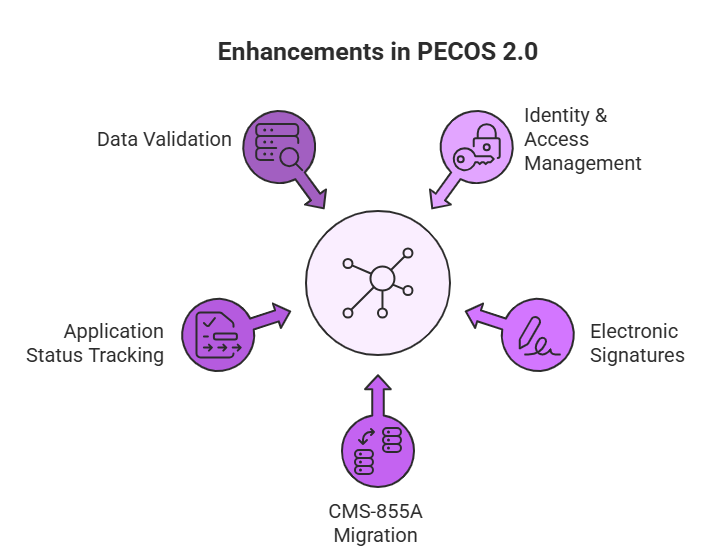
PECOS 2.0 introduces structural and security updates. These changes affect how providers complete enrollment tasks.
1. Identity & Access (I&A) Management Integration
- Mandatory multi-factor authentication
- Role-based access control
- Secure login through CMS PECOS login 2026
2. Electronic Signature Requirements
- Authorized officials must sign applications electronically
- Signature must match I&A credentials
- Unsigned applications are rejected
3. CMS-855A Migration
- Institutional providers must transition to digital submission
- Data must match existing CMS records
- Errors delay processing and trigger rework
4. PECOS Application Status Tracking
- Real-time status updates
- Clear indicators: submitted, pending, returned, approved
- Faster identification of missing data or errors
5. Improved Data Validation
- System flags incorrect or incomplete entries
- Reduces manual corrections by CMS
CMS PECOS login 2026 and Identity & Access (I&A) Management
This section explains how to access PECOS 2.0 using CMS PECOS login 2026 and how Identity & Access (I&A) Management controls user access.
A correct login setup is required before any enrollment action. Errors in access or authentication delay PECOS 2.0 provider enrollment and application submission.
CMS PECOS login 2026 Steps
Access to PECOS 2.0 provider enrollment starts with the CMS PECOS login in 2026. Follow these steps to enter the system correctly:
1. Go to the official CMS enrollment portal
2. Select the PECOS login option
3. Enter I&A credentials
4. Complete multi-factor authentication
5. Choose the appropriate role (provider or delegate)
Identity & Access (I&A) Management
Identity & Access (I&A) Management controls who can access PECOS 2.0. It links users to their roles and responsibilities.
Key points:
- Required before using the PECOS 2.0 provider enrollment
- Links the National Provider Identifier (NPI) to the user account
- Assigns roles such as authorized official or delegate
- Requires identity verification and secure credentials
Common Login Issues
Login issues often delay PECOS 2.0 provider enrollment. These are the most frequent problems:
1. Expired or incorrect I&A credentials
2. Multi-factor authentication failure
3. Mismatch between NPI and user profile
4. Incorrect role assignment in the I&A system
5. Locked or inactive accounts
PECOS 2.0 Provider Enrollment Process Step-by-Step
This section explains the exact workflow for PECOS 2.0 provider enrollment. It breaks the process into clear steps to reduce errors and delays.
Each step must align with CMS rules. Missing details, incorrect data, or skipped validation lead to rejection or longer processing time.
Step 1: Prepare Required Information
Before starting PECOS 2.0 provider enrollment, collect all required data.
- National Provider Identifier (NPI)
- Tax Identification Number (TIN)
- Practice location details
- Ownership and managing control data
- Supporting documents for verification
Step 2: Start Application in PECOS
Begin the application through the CMS PECOS login 2026.
- Access PECOS using I&A credentials
- Select “New Enrollment” or “Update Information”
- Choose provider or organization type
- Select appropriate CMS form (e.g., CMS-855A for institutional providers)
The system connects directly with Identity & Access (I&A) Management. Access depends on assigned roles. Only authorized users can proceed with PECOS 2.0 provider enrollment.
Step 3: Complete Data Entry
Enter all required information carefully.
- Provider demographics
- Practice and service location details
- Ownership and control information
- License and certification details
Validate each field before moving forward. The system flags errors in real time, but user verification is still required.
Step 4: Submit and Track Application
After completing data entry, submit the application.
- Review all entered data
- Confirm electronic signature
- Submit the application through PECOS
After submission, monitor PECOS application status:
- “Submitted” indicates successful submission
- “Pending” means CMS review is in progress
- “Returned” indicates missing or incorrect data
- “Approved” confirms completion
Respond to CMS requests quickly. Delays in response slow down PECOS 2.0 provider enrollment processing.
PECOS application status and tracking
This section explains how to monitor the PECOS application status during PECOS 2.0 provider enrollment. Tracking helps identify errors early and reduces processing delays from CMS reviews.
How to Check Application Status
Use the CMS PECOS login 2026 to check application status.
1. Log in through Identity & Access (I&A) credentials
2. Open the PECOS dashboard
3. Select the submitted application
4. View current status and messages
Common Status Types
PECOS application status uses clear labels.
Submitted: Application received by CMS
Pending: Under review or awaiting action
Returned: Errors or missing data identified
Approved: Enrollment completed successfully
Denied: Application rejected due to compliance or data issues
How to Respond to Requests
CMS may request additional information during review.
1. Log in to PECOS through CMS PECOS login 2026
2. Open the application in question
3. Review CMS comments or requests
4. Provide required documents or corrections
5. Re-submit within the given timeframe
Electronic signature requirements in PECOS
This section explains electronic signature requirements in PECOS 2.0 provider enrollment.
Correct signature use is required before submission and affects approval status.
What is Required
PECOS requires an authorized official to provide an electronic signature.
- Must match Identity & Access (I&A) credentials
- Required for all submitted applications
- Applies to updates, revalidations, and new enrollments
- Must be completed before final submission
How Electronic Signatures Work
The system verifies the signer through the CMS PECOS login 2026.
- User logs in using I&A credentials
- System confirms authorized role
- Signature is applied digitally within PECOS
- Timestamp is recorded for validation
Common Signature Errors
Errors in electronic signatures are a frequent cause of delays.
1. Unauthorized user signs the application
2. Signature does not match I&A credentials
3. Application submitted without a signature
4. Expired or inactive user account
5. Role not assigned correctly in the I&A system
These issues lead to returned applications. Always verify authorization and credentials before signing.
CMS-855A migration and application updates
This section explains CMS-855A migration within PECOS 2.0 provider enrollment.
It covers how institutional providers must update and submit enrollment data in the new system.
What is CMS-855A Migration
CMS-855A migration refers to the shift of institutional enrollment from paper or legacy systems to PECOS 2.0.
It applies to hospitals, skilled nursing facilities, and other institutional providers.
The process converts enrollment data into a digital format using the CMS PECOS login 2026.
Accurate data entry is required to maintain alignment with CMS records and track PECOS application status.
Impact on Providers
CMS-855A migration changes how providers manage enrollment data and compliance requirements. It requires updated records, correct Identity & Access (I&A) Management roles, and valid electronic signatures.
Incomplete or incorrect data affects billing and claim processing timelines.
Delays in enrollment updates can interrupt Medicare payments and create compliance risks.
Required Actions for Providers
Providers must complete key steps to meet CMS-855A migration requirements.
This includes reviewing data, confirming I&A roles, and submitting updates through PECOS 2.0.
After submission, providers must track PECOS application status and respond to CMS requests. Accurate updates and timely responses reduce delays in PECOS 2.0 provider enrollment processing.
Conclusion
PECOS 2.0 provider enrollment requires accurate data entry, correct Identity & Access (I&A) setup, and compliance with electronic signature requirements. Small errors in login, roles, or documentation can delay approvals and affect Medicare participation.
Following a clear process, verifying CMS-855A migration data, and monitoring PECOS application status ensures faster approvals. Consistent review and timely responses help maintain compliance and reduce enrollment delays.
FAQs
What is PECOS 2.0 provider enrollment?
PECOS 2.0 provider enrollment is the CMS system used to enroll or update Medicare provider information. It replaces older processes and allows digital submission, tracking, and validation of applications.
How do I access PECOS 2.0 in 2026?
You must use the CMS PECOS login 2026 with valid Identity & Access (I&A) credentials. Multi-factor authentication is required before accessing enrollment features.
Why is my PECOS application status showing “Returned”?
A “Returned” status means CMS found missing or incorrect information in your application. You must review CMS comments, correct errors, and resubmit within the given timeframe.
Who can sign a PECOS 2.0 application electronically?
Only an authorized official assigned through Identity & Access (I&A) Management can sign. The electronic signature must match the user’s credentials and assigned role.
What is CMS-855A migration in PECOS 2.0?
CMS-855A migration refers to moving institutional provider enrollment into the PECOS system. It requires accurate data updates and digital submission to maintain active Medicare enrollment.